Home Buying with MyCNBox
Buying a MyCNBox Spreadsheet find through two payments
This is how to buy a find with MyCNBox, told around the two moments when money leaves your account. Screenshots are the operator's own, from its beginner guide; the amounts in them are its examples.
Pasting the link, picking the spec, writing the remark
Start with a MyCNBox account; this one is the sign-up link we use. Then open a find from the catalog, copy the listing's web address, and drop it into the MyCNBox home page search field. The operator's guide names Taobao, Tmall, 1688 and Weidian links (help article 103). MyCNBox loads the listing on its own product page with the seller's photos and options.
Choose the size and color exactly as the seller labels them. If the item is customized, leave a message in the remark field; the remark is not for sizing advice. Two things do not work here: virtual products cannot be bought (help article 22), and a coupon code or private discount from the seller cannot be entered. Ask the seller to change the price on the link itself first, because the price showing when you pay is the price charged (help article 94).

The first payment covers the item and its trip to the warehouse
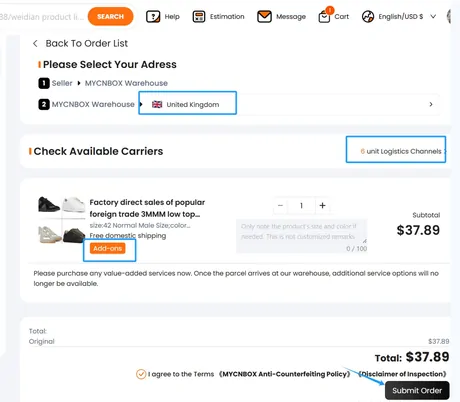
The order page asks for two things: where the item goes (seller to the MyCNBox warehouse, then on to your country) and which carriers are available for that country. You pay the item price plus the seller's China shipping. International postage is not part of this payment.
This is also the only moment to buy warehouse add-ons such as Detailed Photography; the page says so in plain words, and the help center repeats it (help article 32). Before the Submit Order button sits a box agreeing to the terms, including the MyCNBox Anti-Counterfeiting Policy, which makes the buyer responsible for buying only authentic products.
Points can cover up to half of this payment. Cards need 3DS verification, and help article 63 lists Visa, Mastercard, Apple Pay, Google Pay, Klarna and iDeal; article 102 gives a different list. Each link is its own order with its own China shipping fee, even from the same seller (help article 27).
Between the payments: purchase, dispatch and warehouse intake
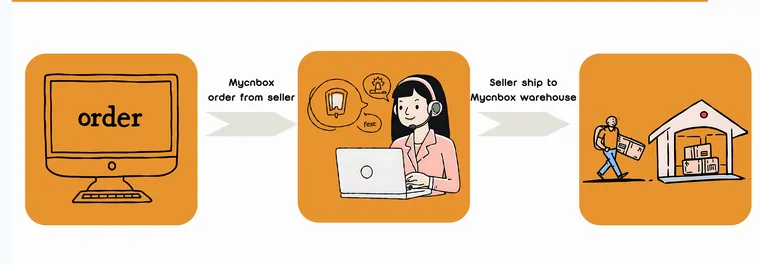
Within one business day of payment, a MyCNBox buyer places the order with the seller. The seller then ships to the warehouse, which takes about 1 to 3 days according to two help articles (help 31, help 102) and about 2 to 5 days according to a third (help 14); pre-orders and out-of-stock items take longer. When the parcel lands, the warehouse logs it, photographs and weighs the item within one business day (help 16).
Things that go sideways here, and what MyCNBox says to do: no tracking after five days usually means the seller is out of stock, and you can cancel and pick another link (help article 24). Some Weidian sellers ship slowly; after seven days without dispatch, ask support for a refund (help article 15). If the seller removes the item or sells out, the order is canceled and the money returns to your balance (help article 29). None of this costs points; any points used on the payment are part of what the help center does not address, so ask support if a large balance is involved.
The second payment covers the international parcel
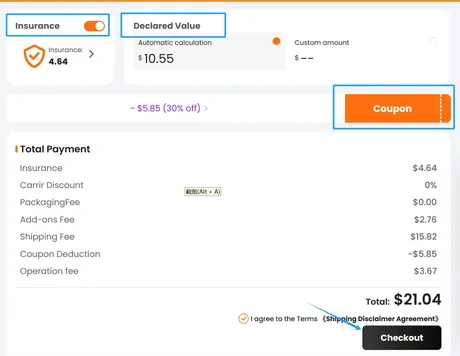
When everything you want has arrived, select the items on the warehouse page and submit them for packing. The form asks for your overseas address, packing add-ons, a shipping line, optional insurance and a declared value. MyCNBox's address rules are strict: the delivery address must match your payment billing address, it must be outside mainland China, and it cannot be changed once the parcel ships (help article 43, help article 10).
Insurance costs 3% to 8% of the item value depending on the line (help article 50). One coupon can be applied per parcel. The postage you pay is an estimate; the final charge is set after packing, by weight and size. Points can cover up to half of this payment too, and the cash part is what the shipping points table scores.
We do not give advice on declared values. The help center explains the options in help article 46, and the choice is yours.
After dispatch: tracking, postage refunds and shipping points
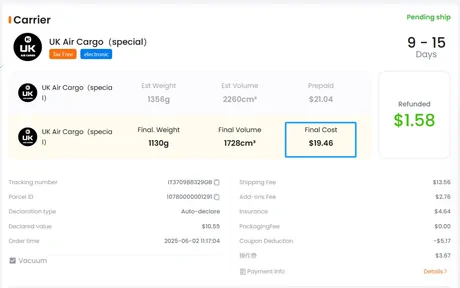
Parcels are packed within one business day of the packing request and shipped within one business day of paying the postage (help article 42). The operator's own example shows the settling-up clearly: an estimated 1,356 g parcel prepaid at $21.04 came out at 1,130 g and $19.46 after packing, and the $1.58 difference was refunded. Overpayments go back to your balance; underpayments appear under Pending Additional Payment and must be paid before the parcel moves (help article 48).
Shipping order points are credited when the parcel ships, scored on the postage you paid in cash. Tracking can go quiet; MyCNBox has articles for no update after dispatch (help article 56) and for gaps of more than seven days (help article 55).
The same order in the MyCNBox app
MyCNBox has an iOS app, published by its Hong Kong company with a first release date of October 3, 2025 on its App Store listing, and an Android app. Both follow the same two payments: paste the link, choose the spec, check out with the country and add-ons, then submit packing from the warehouse tab and choose a carrier and insurance. The mobile guide shows each of those screens (help article 91).
Points work the same in the app, and the app home screen has its own shortcuts for coupons, the calculator and help.
Download links: MyCNBox on the App Store and MyCNBox on Google Play.