Home Fees and rates
What a MyCNBox find costs once points, rates and refunds are counted
No purchasing service fee does not mean no costs. Here is the full cost structure of a MyCNBox order, the exchange rate behind it, and what happens to your money when an order unwinds.
The money that moves in one MyCNBox order
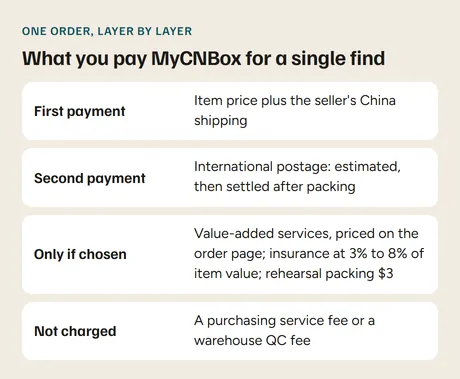
MyCNBox charges no service fee for purchasing and none for warehouse receiving or QC. Its own example: an item at ¥100 costs you ¥100, and if you pay in another currency, any conversion fee is taken by the bank or payment channel, not by MyCNBox (help article 60). The operator sums it up as original product price plus international shipping (help article 99); in practice the seller's China shipping is paid with the item at the first payment.
On top of that come only the things you choose: value-added services priced on the order page (help article 61), insurance at 3% to 8% of item value, rehearsal packing at $3 per parcel, and return costs if you send something back. The sample shipping payment in the operator's guide also lists an operation fee line, which the help center does not define.
Points come off before conversion, so every 100 points you spend is ¥1 less that passes through your bank's exchange.
Yuan at checkout, your currency on the statement
MyCNBox shows prices in your chosen display currency (sixteen are offered) and settles in yuan. Its rate is updated daily and, in its words, closely tracks real-time Google rates; the gap is put down to conversion fees, settlement fees and spread charged by payment providers, and the article adds: “We do not manually inflate exchange rates” (help article 59).
An independent comparison table updated October 2, 2026 put MyCNBox's exchange-rate markup at 10.3%. That is a measurement on one day, not a fixed fee, but it is a useful order of magnitude when you compare a yuan price with your bank statement.
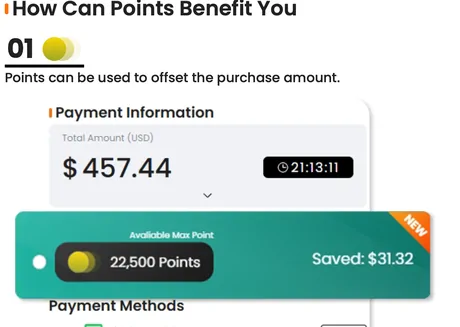
The operator's points screenshot shows the conversion in action: 22,500 points, worth ¥225, appear as Saved $31.32, which works out at about 7.18 yuan to the dollar on the day it was taken.
Cards, wallets and 3DS checks
Two MyCNBox help pages list payment methods, and they differ. Article 63 lists Visa, Mastercard, Apple Pay, Google Pay, Klarna, iDeal and certain local wallets (help 63). Article 102 lists Visa, Mastercard, Apple Pay, PayPal, Skrill and certain local wallets (help 102). The site footer shows logos for Visa, Mastercard, Apple Pay, PayPal, Skrill and BLIK. We have not merged them; check the payment page in your account.

Card payments go through 3D Secure verification, usually a code by text message. If a payment fails, MyCNBox suggests checking the funds, the card number, name and billing address, or switching to Apple Pay or Google Pay (help article 67). If a paid order still shows unpaid after a minute, contact support with the order number (help article 68). Some accounts are asked for KYC checks, which MyCNBox calls a requirement of the Chinese receiving banks; if KYC fails, orders are canceled and the balance can be withdrawn, less fees the payment processor already took (help article 130).
Your MyCNBox balance comes before your card
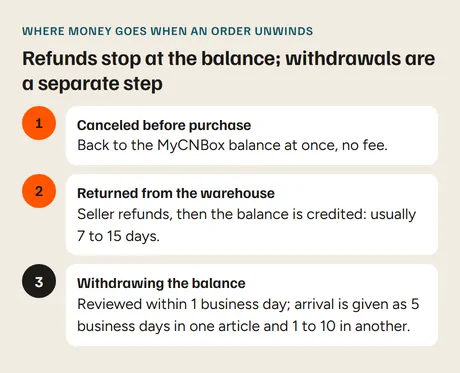
Cancellations and returns are refunded to your MyCNBox balance, not straight to your card (help article 125). A cancellation before purchase is instant; a return waits for the seller, usually 7 to 15 days, sometimes longer when a seller lets the platform deadline run out (help article 19). Refunds are calculated on the yuan actually left after conversion, so the amount in your own currency can differ from what you paid (help article 20).
Withdrawing the balance is a separate step: My, then Wallet, then Withdrawable Balance. Requests are reviewed within one business day and returned to the original payment method. The help pages give arrival as usually 5 business days (help article 64) and as 1 to 10 business days (help article 66). MyCNBox charges no withdrawal fee; the bank or processor typically takes $1 (help article 65). As read on November 9, 2026, help article 64 opens by asking users to contact customer service for withdrawals while the function is being worked on.
Four help pages, four wordings of the return bill
When the reason for a return is yours, MyCNBox describes the cost in four slightly different ways across its help pages. Article 20 is the fullest: you lose the China shipping you paid to get the item to the warehouse, ¥12 to send it back and a ¥10 warehouse fee. We list all four so you can see they agree on ¥12 and differ on the rest.
| Article | What it says you pay |
|---|---|
| Help 17 | ¥12 shipping back to the seller |
| Help 92 | ¥12 to the seller plus a ¥10 service fee |
| Help 20 | China shipping to the warehouse, ¥12 to the seller and a ¥10 warehouse fee |
| Help 125 | Domestic return shipping, deducted from the payment |
Seller mistakes are the exception: no fee, and the seller is asked to cover the return shipping.