Home Points split
Split a MyCNBox order between points and cash
Four rules decide how much of an order MyCNBox points can pay. The calculator below applies them to your numbers, then shows the points that order brings back, so you can see both sides of the trade before you pay.
Points split calculator
Enter one order. The calculator applies MyCNBox's four spending rules, then looks up the points the order earns back in the purchase or shipping table and multiplies by your level.
Waiting for an amount and a balance.
Fill in both fields on the left. Nothing is sent anywhere; the sums run in your browser.
Points this order earns back:
Filling in the Points split
Here is how to use the calculator. Pick the order type first. A purchase order is the first payment for a find (item plus the seller's China shipping); a shipping order is the international postage for a packed parcel. The two use different earning tables, so the choice changes the second half of the result.
Type the order amount in whole yuan as it appears on the MyCNBox order page, and your current points balance. Commas in the balance are accepted; decimals, minus signs and scientific notation such as 1e2 are not, and the field will tell you why instead of guessing. Choose your level last. Clear a field and the result disappears until both numbers are valid again.
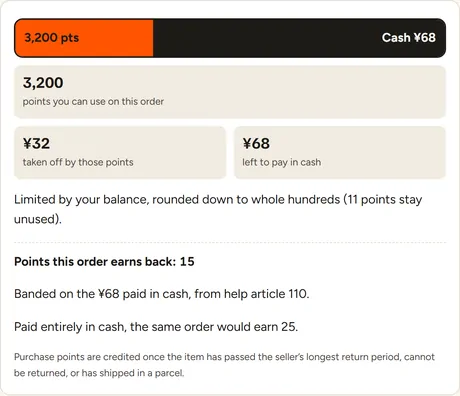
The bar shows the split, orange for points and dark for cash. Below it you get the points you can use, the yuan they cover, the cash left, and the base points the order earns back multiplied by your level.
Four rules MyCNBox sets on spending points
- 100 points equal ¥1. 10,000 points take ¥100 off, the operator's own example.
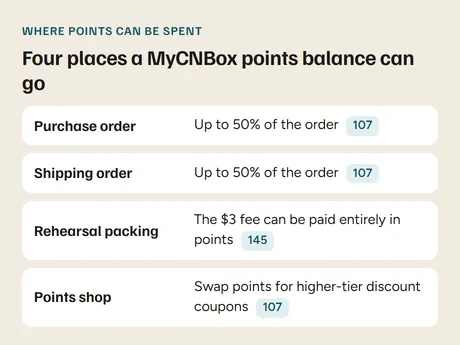
- Half the order at most. On purchase and shipping orders points cover up to 50% of the order amount.
- Whole hundreds only. With 3,211 points the most you can use is 3,200.
- Ninety days to use them. Points carry a 90-day validity period.
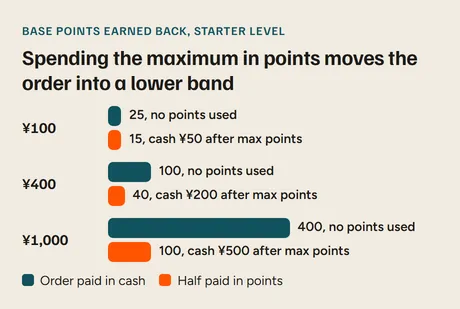
The help article phrases its 50% example in dollars (a $100 order, up to $50 in points) while the rate itself is set in yuan. The order page shows the saving in your display currency: in the operator's screenshot, 22,500 points appear as Saved $31.32.
Spending points can lower what an order earns back
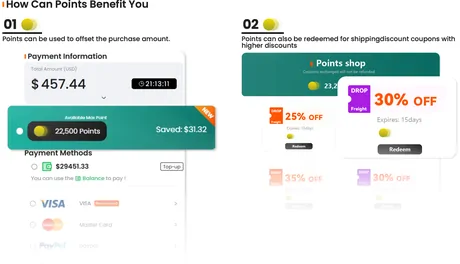
MyCNBox bands its earning tables by the amount you paid excluding the points deduction. Spend the maximum on a ¥100 purchase and the cash part, ¥50, falls into the 50 to 99 band: 15 base points instead of 25. On a ¥1,000 purchase, paying ¥500 in points drops the award from 400 to 100 base points.
Is that a bad trade? Not in money terms. On the ¥1,000 order you save ¥500 now and give up 300 base points, which are worth ¥3. The calculator shows the comparison anyway, because the drop surprises people who expected points to earn on the full price, and because it matters when you are a few yuan short of a band edge.
Shipping orders work the same way with their own bands, which start at ¥50.
Rehearsal packing and the Points shop
The 50% ceiling belongs to purchase and shipping orders. Rehearsal packing is different: its $3 per-parcel fee can be paid entirely in points, or with a mix of card, balance and points (help article 145). Among the charges in the help center, it is the only one points can cover in full.
Points can also be swapped for higher-tier discount coupons in the Points shop. The shop itself sits behind a login, so we cannot list its current prices; the operator's screenshot shows 25%, 30% and 35% off shipping coupons as examples. MyCNBox lets you apply one coupon per parcel when you submit it for shipping (help article 11).
This calculator leaves coupons out on purpose. The help center does not say whether a coupon is applied before or after points, and a tool that guessed would give you a wrong number with confidence.
What the help center leaves unsaid about points
We read all 111 MyCNBox help articles on November 9, 2026 and found no answer to four questions. How a multiplier result is rounded: King's 1.5x on a 15-point award gives 22.5, and the calculator shows it as 22.5. Whether points used on an order come back if the item is returned. Whether coupons or points are taken first at the shipping payment. And which currency the level thresholds are written in.
Where we cannot know, the calculator says so rather than filling the gap. If you find the answer in your account or from support, tell us and we will add it with the date.
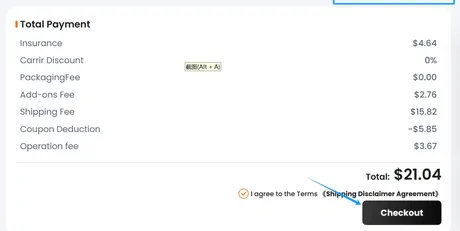
The payment screen here shows how a shipping payment is itemized: insurance, packaging, add-ons, the shipping fee, a coupon deduction and an operation fee line that the help center does not define.