

Home Earning points
MyCNBox points, source by source, with the level multiplier applied
Seven kinds of activity add points to a MyCNBox account. Each has a base table and a trigger that decides when the points actually arrive. The tables below are copied from the help center as read on November 9, 2026.
Purchase orders: points that wait out the return window

A purchase order earns points once three things line up: the warehouse has received the item, and the item has either passed the seller's longest return period, does not allow returns, or has already left in one of your parcels. Until then the points are not in your account and cannot be spent. If you ship an item quickly, its purchase points arrive with the parcel.
| Amount paid | Base points |
|---|---|
| ¥10 to 49 | 10 |
| ¥50 to 99 | 15 |
| ¥100 to 199 | 25 |
| ¥200 to 399 | 40 |
| ¥400 to 699 | 100 |
| ¥700 to 999 | 280 |
| ¥1,000 and up | 400 |
The band is set by what you paid in cash, so a ¥120 order paid with 4,000 points (¥40) is scored on ¥80 and lands in the 15-point band. There is also a quiet jump between ¥699 and ¥700, where the award goes from 100 to 280; if a two-item order sits just under ¥700, the band is worth knowing about before you decide how many points to spend.
Shipping orders: points credited on dispatch

Shipping orders have one condition only: the parcel has shipped. The table starts higher than the purchase table, at ¥50, and runs to 1,000 base points for postage of ¥3,000 or more. Like purchases, the band uses the amount after any points you spent on the postage.
| Postage paid | Base points |
|---|---|
| ¥50 to 99 | 20 |
| ¥100 to 199 | 40 |
| ¥200 to 399 | 80 |
| ¥400 to 699 | 150 |
| ¥700 to 999 | 300 |
| ¥1,000 to 1,999 | 450 |
| ¥2,000 to 2,999 | 800 |
| ¥3,000 and up | 1,000 |
Postage is paid as an estimate and settled after packing, and the help article does not say whether the award follows the estimate or the final figure. If your postage sits close to a band edge, such as ¥98 or ¥402, treat the band as approximate rather than a promise.
A shared item link that a friend buys from

Every item you have bought has a share link, reached from the order page or the Review/Share button once you are logged in. When a friend buys through it, you earn base points by the size of their purchase, credited after the seller's return period or once international shipping is complete. The bands start at ¥50 and pay more generously than your own purchases: a friend's ¥400 order earns you 350 base points, against 100 for the same amount bought yourself.
| Friend's purchase | Base points |
|---|---|
| ¥50 to 99 | 40 |
| ¥100 to 199 | 80 |
| ¥200 to 399 | 160 |
| ¥400 to 699 | 350 |
| ¥700 to 999 | 450 |
| ¥1,000 and up | 550 |
MyCNBox also runs a separate affiliate program. We do not cover it here; this page sticks to points.
Lifetime purchase and shipping totals

Two milestone ladders run in the background, one for everything you have spent on purchases (help 113) and one for everything spent on postage (help 114). They use the same steps. Each time a running total passes a step, the base award for that step is added. The purchase ladder counts an item once it meets the same conditions as purchase points; the shipping ladder counts a parcel once it ships.
| Total reaches | Base points |
|---|---|
| ¥1,000 | 100 |
| ¥2,000 | 200 |
| ¥4,000 | 400 |
| ¥8,000 | 800 |
| ¥15,000 | 1,500 |
| ¥30,000 | 3,000 |
| ¥60,000 | 6,000 |
| ¥100,000 | 10,000 |
| ¥200,000 | 20,000 |
| ¥500,000 | 50,000 |
| ¥1,000,000 | 100,000 |
The ratio is a flat tenth of a point per yuan at every step, so the ladder rewards steady spending rather than one big order. A reader who has spent ¥1,200 on items and ¥800 on postage has passed the first purchase step and not yet the first shipping one.
Daily check-ins and the birthday award
Checking in on consecutive days pays a rising base award, 10 points on day one up to 150 on day seven, then the cycle starts again. Miss a day and the streak drops back to day one (help article 117). A full week is 400 base points, which is ¥4 at Starter level.
The birthday award is 500 base points, multiplied by your level on the day, so 750 at King. The catch is in the pop-up: once the birthday is saved it cannot be changed, so type it carefully the first time (help article 118).
| Streak day | Base points |
|---|---|
| Day 1 | 10 |
| Day 2 | 20 |
| Day 3 | 30 |
| Day 4 | 40 |
| Day 5 | 60 |
| Day 6 | 90 |
| Day 7 | 150 |

Posts about a finished order on TikTok or Reddit
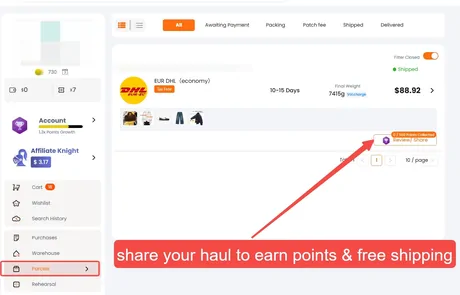
Once a purchase meets its points conditions, or a parcel has shipped, a Review/Share option appears on the order. From there you can submit a TikTok video or a Reddit post about it. The post has to be less than three days old when you submit it and must carry the word mycnbox (in the video or, on Reddit, in the title). Support reviews it over 72 hours, and starts counting views or upvotes 48 hours after submission.
On TikTok, only haul videos with real content count, such as a review, styling or an unboxing; a video of QC photos alone is turned down (help article 108). On Reddit the post needs images and text with your QC image, the item link, the price and a description (help article 109). Under the newer community program, every valid post earns at least 1,000 points, and one post a week wins 5 kg of free shipping, announced in the MyCNBox Discord (help article 159).
| Views | Base points |
|---|---|
| 400 views | 400 |
| 800 views | 800 |
| 1,000 views | 1,000 |
| 2,000 views | 2,000 |
| Upvotes | Base points |
|---|---|
| 1 upvote | 300 |
| 10 upvotes | 1,000 |
| 20 upvotes | 3,000 |
| 50 upvotes | 5,000 |
| 100 upvotes | 10,000 |
| 200 upvotes | 18,000 |
| 500 upvotes | 50,000 |
| 1,000 upvotes | 100,000 |
The points list in help article 107 also names Item Review Points and Review Us On Trustpilot as sources, with no table of their own in the help center. We list them for completeness and have nothing to add about either.
Level multipliers from Starter to King

Your level is set by accumulated spending on purchases and postage combined, and it never drops: once reached, a level is permanent. The only thing a level changes in the help center's description is the multiplier on every points award above. The threshold column is printed as MyCNBox prints it; the table does not say which currency it is in, and the level page in the account needs a login, so we have not added a currency sign.
| Level | Accumulated spending (currency not stated) | Multiplier |
|---|---|---|
| Starter | 0 | 1x |
| Explorer | 1,000 | 1.1x |
| Insider | 2,000 | 1.2x |
| Elite | 3,000 | 1.3x |
| Legend | 8,000 | 1.4x |
| King | 20,000 | 1.5x |
The operator's own example: base points of 10 at a 1.5 multiplier give 15. When the result is not a whole number, as with 1.5 times 15, the help center does not say how it is rounded. Our calculator shows the unrounded figure and labels it.