

Home QC photos
MyCNBox QC photos, settled when you place the order
Warehouse photos are your one look at an item before it leaves China. At MyCNBox the most important QC decision is made earlier than most people expect: at the first payment.
The four photos every MyCNBox item gets
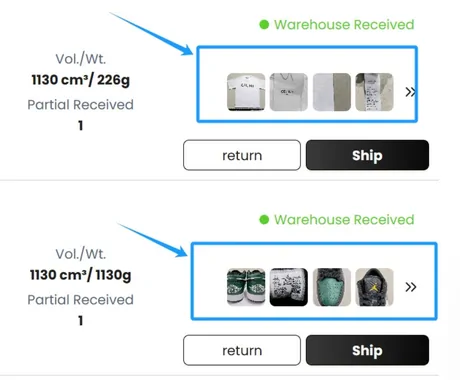
Standard QC at MyCNBox is four photos per item (help article 32). The warehouse logs, photographs and weighs an item within one business day of its arrival, and the photos appear as thumbnails on the item's line in your warehouse list, next to its volume and weight.
Video is where the operator's pages disagree. One help article promotes QC videos of about 15 seconds giving a 360-degree view (help article 97), the site footer links to Free QC Video and the app icon says the same; yet the value-added list sells video recording (help article 40) and another article lists video QC among paid extras (help article 61). Read in November 2026, both sides are live, so check what your own warehouse line shows before paying for a video.
Several identical units from one link get one randomly chosen unit photographed. MyCNBox treats each unit as its own product and calls the default a spot check (help article 157).
Extra photography has to be bought at checkout
Need more than four photos, such as a close-up of a tag or a measurement? MyCNBox sells Detailed Photography, and you can describe what you want in the order notes. The catch: it can only be bought when you submit the purchase order. Once the item has reached the warehouse and been photographed, it is shelved and cannot be taken down for more pictures (help article 32, help article 88).
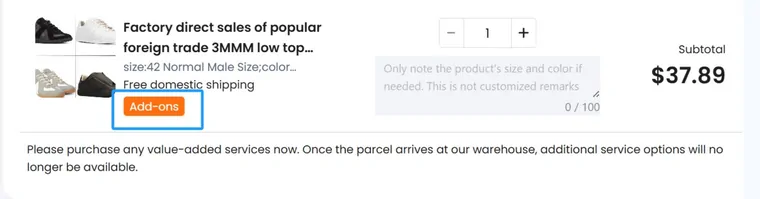
For bulk orders the extra photos are bought per unit. MyCNBox's example: ten identical items, photos wanted for three, so three Detailed Photo purchases (help article 158). The price of the service sits on the order page behind a login, so we cannot print it. Our rule of thumb from reading the policy: if you would return the item over a detail the standard four photos might miss, buy the extra photography now, because there is no second chance.
Four MyCNBox warehouse photos next to the seller's own
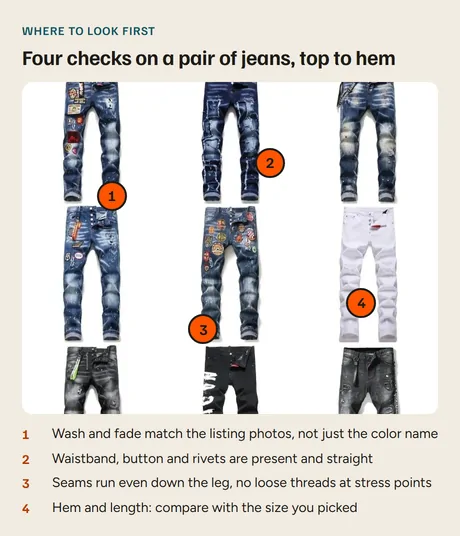
Here is how to read QC photos without guessing. Open the listing in one tab and the photos in another, and compare the same views: front, back, close-ups. Color names on Chinese listings are loose, so judge the color from the listing photos, allowing for warehouse lighting. Count the pieces and accessories, since sets and bundles are where mistakes happen.
Then check what the photos can actually show. Stitching, print alignment, hardware and obvious flaws show up well; exact measurements do not, unless you asked for them in Detailed Photography notes. On finds lists people call the outcome GL (green light, keep it) or RL (red light, return it); the glossary is on our help page.
Do it quickly. A return request has to be made within 5 days of the item entering the warehouse (help article 35).
Returns from the warehouse: seller's fault or yours
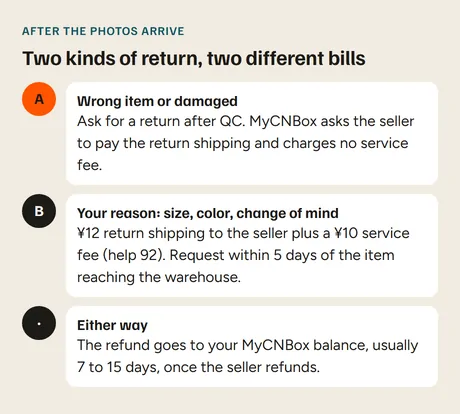
If the seller sent the wrong color, size or style, or the item is broken, request a return from the order. MyCNBox asks the seller to pay the return shipping and charges no service fee; you can even place a new order at the same time and let the refund follow (help article 36, help article 92).
If the reason is yours, from a size you picked to a change of mind, the return costs ¥12 shipping to the seller plus a ¥10 service fee to MyCNBox (help article 92). The refund goes to your MyCNBox balance once the seller pays it, usually in 7 to 15 days.
MyCNBox may not be able to help when a seller refuses returns, when the request is outside the seller's return period, or when the issue concerns quality, authenticity or compliance (help article 125). If a problem only shows up after the parcel reaches you, returning it is at your own shipping cost (help article 89).
Storage after QC, and purchase points still waiting

Three 90-day clocks run at MyCNBox and it is easy to mix them up. Items are stored free for 90 days, after which you buy extended storage or the packages are discarded (help article 33). Rehearsed parcels left more than 90 days are destroyed (help article 147). And points expire 90 days after they are credited (help article 107).
The points for an item you are storing are not in your account yet. A purchase order pays out once the item has passed the seller's longest return period, cannot be returned, or has shipped in a parcel. Shipping a stored item sooner therefore brings its purchase points forward, and starts their own 90-day clock.